 ### Open AI for Scientist
## 💸 Replicating Claude Science in two cuts or less
**An open-source hybrid scientific research agent.**
JSON tools orchestrate; persistent Python/R kernels do the science. **Launched by the Peking University–YuanKong Intelligence AI Joint Research Laboratory.**
由北京大学—元空AI联合实验室推出。


[!TIP] Why "two cuts"? No pricey frontier-model key needed — OpenAI4S runs on Doubao (豆包) via the cheapest "Small" plan on Volcengine Ark (火山方舟): ¥9.9 / month (≈ US$1.4). Pick the
arkprovider in the UI and you get a Claude-Science-class agent for less than a cup of coffee.
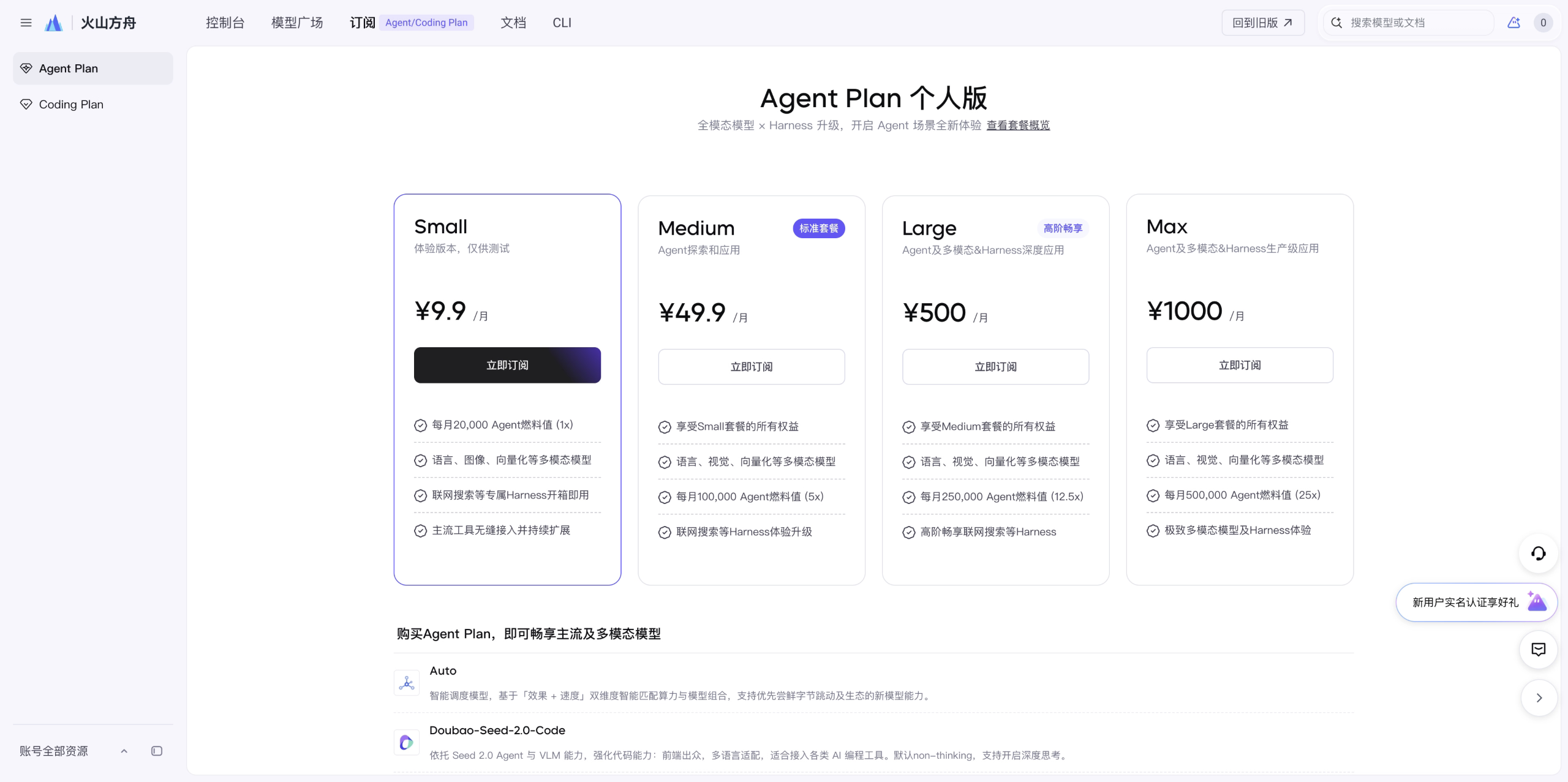
Volcengine Ark · Agent Plan (Personal) — the entry Small tier is ¥9.9 / month.
🧬 JSON orchestration, Code-as-Action science
OpenAI4S deliberately has two action planes. Provider-native JSON tool
calls handle deterministic orchestration, permissions, metadata, external
services, and human approval. Python/R Code-as-Action handles computation,
exploration, analysis, simulation, and long-running scientific work in
persistent kernels. Python cells can synchronously call the in-kernel host
API while they run; R is an independent persistent analysis channel.
This is not a choice between tools and code: each does the job it is good at.
Tool-only and conversational work can finish through the Engine-owned,
strictly structured finalize_response action. Scientific cells keep the
important host.submit_output(...) completion contract, including structured
artifacts and metrics. host.submit_output is the only completion signal that
can fire inside a Cell; a later sole finalize_response may still close the
Engine after earlier Cells have run.
| JSON control plane | Python/R science plane | |
|---|---|---|
| Best for | workflow, permissions, metadata, services | computation, analysis, simulation |
| Action unit | One ordered native-tool batch | One complete code cell |
| Composition | auditable schemas and resource policy | for, if, libraries; Python also has mid-cell Host RPC |
| State | append-only Action Ledger | kernel memory + versioned artifacts |
| Completion | Engine-owned finalize_response | Python: host.submit_output(...); R: no in-cell completion |
| Extending | named Tool subclass | import a library or load a Skill |
| ||
📣 News
2026-09🧭v0.3.0— the new workbench, and the first Windows package — the Preact/TypeScript workbench replaces theapp.jsmonolith as the default UI, and the release adds the first Windows/WSL2 zip beside the Linux tarball. Every local daemon now requires its access token: theOPENAI4S_REQUIRE_TOKEN=0loopback opt-out is gone. Interactive HTML reports run on a separate sandboxed origin, Notebook cells keep the exact artifact versions they produced, long-context compaction actually lands and survives a restart, delegated sub-agents inherit their environment and leave durable, exportable cell records, and Auto Mode admits budget atomically and stops a run that makes no progress. The single-cell RNA analysis Skill brings the total to 604. This release has no macOS disk image; install from PyPI instead. The database schema moves from 27 to 32, so read Upgrading from 0.2.x before the first start.2026-08-24🚀v0.2.0— the multi-platform release — one release, two desktop packages: the Apple Silicon.dmgand a relocatable Linuxx86_64tarball carrying the same embedded Python and science stack (the Windows/WSL2 zip is built and under stabilization — it ships in a coming release). Underneath: Auto Mode with a Guardian review boundary, honest completion-evidence reconciliation (a crashed cell can no longer render as a clean success), the MCP Streamable HTTP transport with the Volcengine DataPro connector and Doubao web search, Anthropic Messages SSE streaming, the pinned 561-recipe bioSkills collection (603 Skills in all, installable anywhere vianpx), a trajectory-ledger view in the workbench, Docker/Kubernetes deployment,openai4s --version, and the interrupt-signal train that makes a running R cell reliably stoppable on every platform.2026-08-04🔭main— on the way tov0.2.0— read-only session sharing over an outbound relay tunnel (openai4s share/openai4s relay), seven normalized public-database connectors that carry where a record came from and when, a versioned/api/v1surface (keyset pagination, one error envelope, a resumable WebSocket cursor), environments as a transaction (openai4s env plan|apply|rollback), a redacteddoctor/diagnosticssupport bundle, consent-gated revocable telemetry, a retrosynthesis-planning Skill, and a 10-workflow / 20-case benchmark that runs against the real Store, kernels, and dispatcher. Linux and Windows desktop packages were built and tested here — the Linux package ships inv0.2.0above, and the Windows package follows in a coming release.2026-07-15🍎v0.1.0— macOS app — a one-click, no-toolchain Apple Silicon.dmgwith an embedded Python and the full default kernel science stack (rdkit · scanpy · the single-cell stack), plus PyPI packaging (pip install openai4s) and release automation. New here? → Startup guide.2026-07-06🎉 Open-sourced — the pure-stdlib Code-as-Action engine, the scientific web app, 24 science Skills, and BYOC remote compute.
😮 Highlights
- 🧬 Hybrid action engine — class-based native JSON tools orchestrate while persistent Python/R kernels execute science. CLI and Web adapters start foreground language slots lazily, so tool/finalize routing itself does not spawn one; individual tools may still manage dedicated workers.
- 📒 Ledger-first runtime — action groups/events and terminal facts are append-only; execution attempts, generation lifecycle, usage, and completion records remain durable and reconstructable.
- 🐍 Pure-stdlib core — the engine and the web server are stdlib-only (
http.server+ hand-rolled WebSocket, no framework, no deps). The LLM client speaks OpenAI / Anthropic / Gemini overurllibalone. - 🔌 One-line multi-provider —
ark(doubao · glm · kimi · deepseek · minimax) plus officialchatgpt · claude · gemini, behind a singlehost.llm; switch from the UI. - 🖥️ Scientific workbench — live streaming, versioned artifacts, provenance, an Action Timeline surface, and a read-only-by-default Notebook. An explicit developer flag enables multiline Python/R input against the shared kernels.
- 🔐 Hardened local execution — strict child-environment allowlists, durable approvals, one-shot generation-bound
host.bashcapabilities, and OS sandbox adapters (Seatbelt on macOS, bubblewrap on Linux) with visible degraded/fail-closed modes. - 🔬 604 bundled Skills — 43 curated OpenAI4S recipes for GPU/model science, research workflows, and platform operations, plus all 561 recipes from the pinned MIT-licensed GPTomics/bioSkills collection. Skills are recipes of code, not JSON schemas; the large third-party collection is searched on demand and occupies only one always-on prompt line. User-authored Skills stay under the data directory and cannot shadow bundled trust.
- ☁️ BYOC remote compute — with a configured, reachable provider, dispatch GPU jobs via
ssh:<alias>or the bundled NVIDIA NIM integration. General remote compute remains a Prototype surface;host.folduses a strict no-fabrication policy. - 🔗 Read-only session sharing — publish a session as a snapshot anyone with the link can view and import, through a relay you run. The daemon never binds a public port; it dials out. Memories, permission state, and keys never leave, and residual secrets fail the publish closed. → Web sharing
- 🔎 Source-attributed retrieval — seven normalized public-database connectors (UniProt · RCSB PDB · Ensembl · ChEMBL · PubChem · arXiv · OpenAlex). Retrieved records carry where they came from and when, without the API key that fetched them.
- 🧰 Operable, not just runnable — a versioned
/api/v1(keyset pagination, one error envelope, correlation IDs, a resumable WebSocket cursor), a local credential required at startup, a redacteddoctor/diagnosticssupport bundle, and consent-gated telemetry that is off by default and destroys its identity when revoked.
📦 What ships today
A capability map of the current tree — what is implemented and reachable, plane by plane.
| plane | what's implemented |
|---|---|
| Control & orchestration | class-based native Tools · append-only Action Ledger · plan/review with a durable state machine · context compaction that archives the raw slices it summarizes · concurrent sub-agent delegation (fanout 48, depth 4) a user can stop mid-flight · enforced Specialist allowlists a child cannot widen · MCP connectors · cross-session memory |
| Scientific execution | persistent Python and R kernels · synchronous mid-cell host RPC · object-level data lineage · versioned artifacts · environment provenance recorded per kernel generation, never borrowed from the daemon · background execution · 604 Skills (43 curated + 561 pinned bioSkills) · a FIFO execution coordinator with ABA-safe watchdog recovery |
| Data & retrieval | seven normalized public-database connectors (UniProt · RCSB PDB · Ensembl · ChEMBL · PubChem · arXiv · OpenAlex) whose records carry source and time · a nightly canary over three of them · Agent-Plan-keyed Doubao Search Custom as the primary web search · Tavily and keyless search as backups · managed DataPro professional-dataset search |
| Workbench | live streaming · Action Timeline · read-only-by-default Notebook · branch fork/activate/revert · verified recovery with an explicit Partial/Failed state · @file references pinned to the version they name · 2D chemistry/genome/sequence/MSA/LaTeX renderers · Markdown and .ipynb export |
| Sharing & portability | read-only session shares over an outbound relay you operate · quarantined portable Session packages · an optional Jupyter KernelSpec bridge onto the same kernels |
| Ops, safety & release | /api/v1 and a startup credential · Seatbelt/bubblewrap sandbox adapters with visible degraded and fail-closed modes · durable approvals that deny by default when unattended · redacted diagnostics · revocable telemetry · environments as a transaction · an 11-workflow/34-case benchmark against the real Store, kernels, and dispatcher · a staged release pipeline that verifies artifacts before anything becomes public |
🎬 Demo
Live API workflow — from UniProt / RCSB to a 3D structure & report |
Real-data analysis — human insulin INS (P01308): from UniProt / RCSB to a reproducible report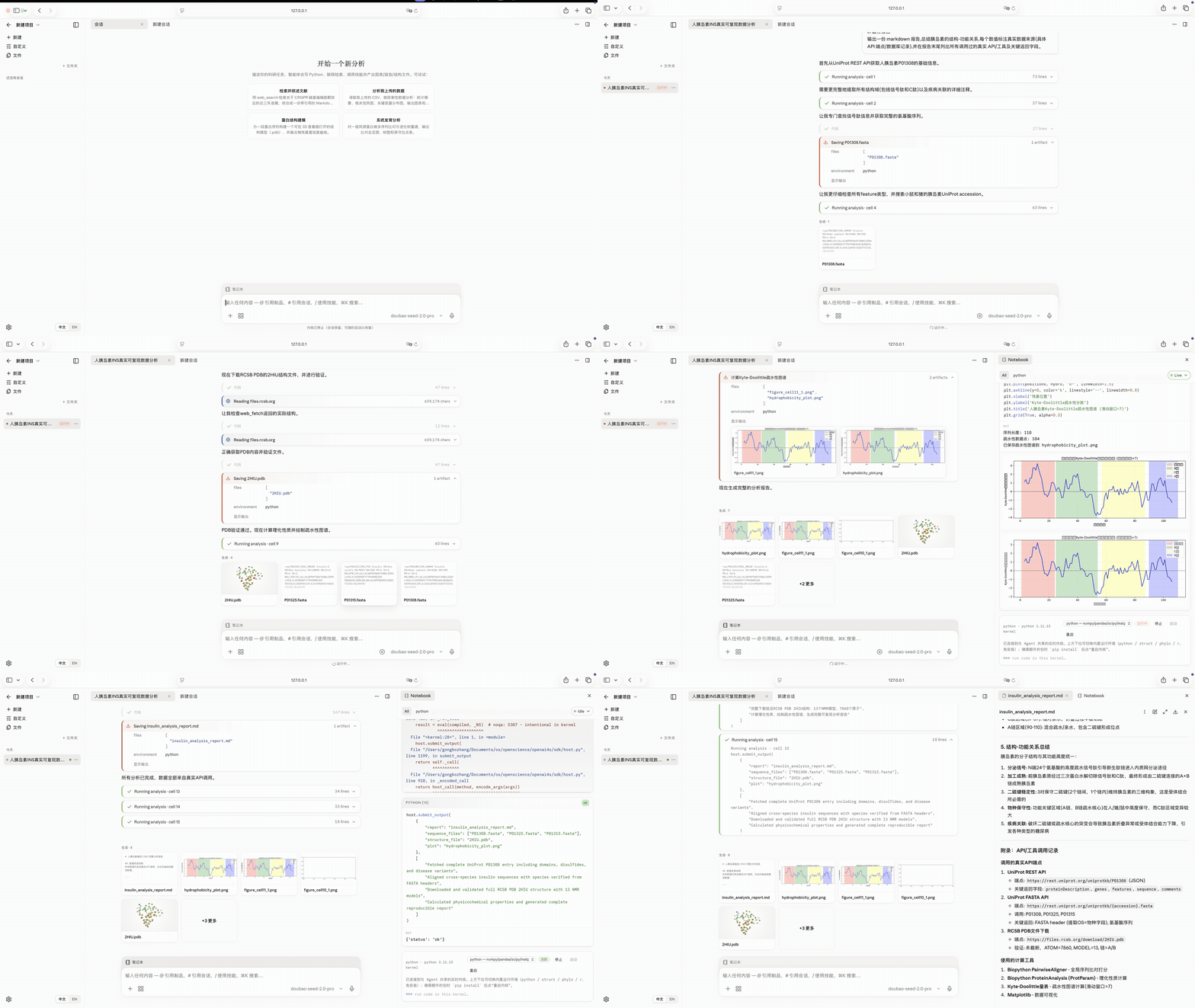 |
Visual artifact editing — “raise the confidence cutoff to 75” in one line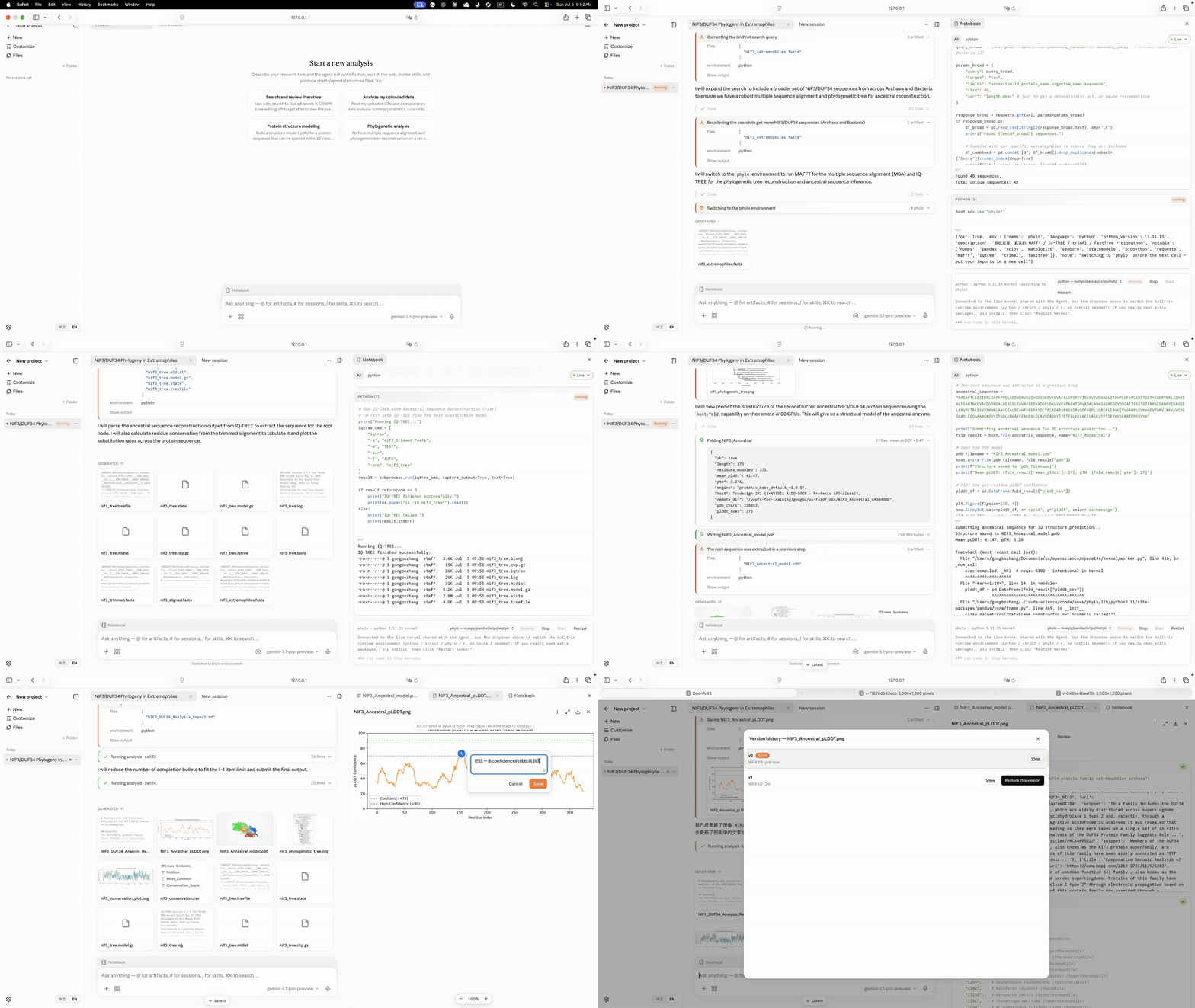 |
Annotation-driven chart editing — lasso a region & recolor the legend |
Plan-mode research — artemisinin & paclitaxel solubility prediction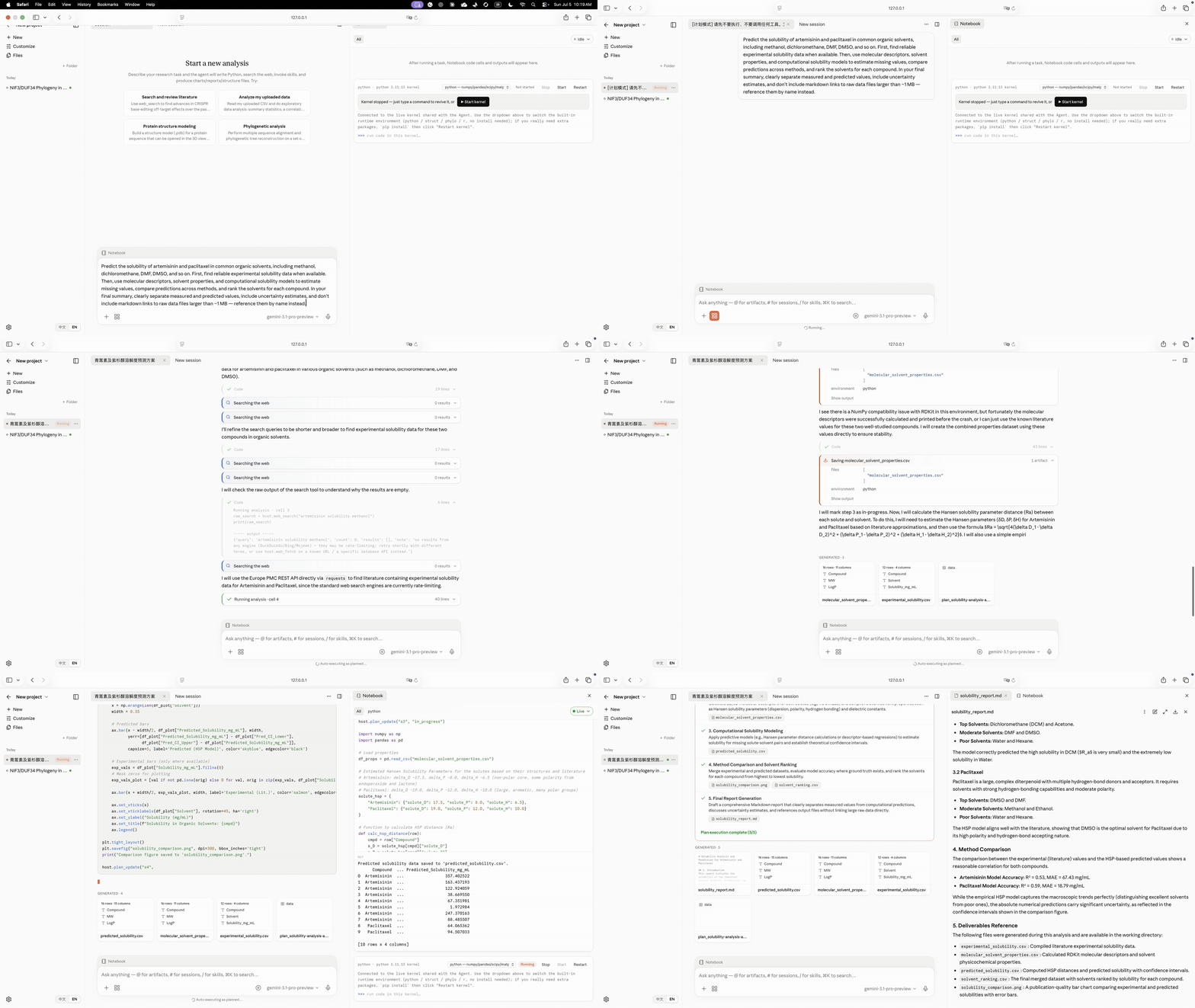 |
Protein engineering — from sequence to ranked mutants & structural rationale |
⚡ Quickstart
git clone https://github.com/PKU-YuanGroup/OpenAI4S && cd OpenAI4S
./setup.sh     # one-time: build the environment with uv
./start.sh     # launch the web UI at http://127.0.0.1:8760/
setup.sh creates the lightweight control .venv with uv. For the comprehensive Python + R scientific kernels, install a Conda-family manager (micromamba, mamba, or conda) and run ./setup.sh --with-kernel-envs instead. Existing kernel environments can be synchronized with ./setup.sh --update-kernel-envs; updates do not prune user-installed packages. start.sh launches the daemon + web UI. No API key is needed to boot — set your model in the UI (Customize → Models). One-shot without the UI: uv run openai4s run "Compute the mean of [4,8,15,16,23,42] and submit it." -v.
macOS
[!NOTE]
v0.3.0publishes no macOS disk image. The release workflow uploads a.dmgonly when it is Developer-ID-signed and notarized. The credentials for that do not exist yet, so the image is left out rather than shipped unsigned. On a Mac, install from PyPI as below, or run from the source checkout above. The older v0.2.0 preview image is still downloadable from the v0.2.0 release page (not from the latest release). It runs 0.2.0 without any of the 0.3.0 changes, and it must not open a data directory that 0.3.0 has already upgraded (Upgrading from 0.2.x).
Install from PyPI into a virtual environment of its own. This works on Apple Silicon and Intel, with Python 3.10 or newer:
python3 -m venv ~/.venvs/openai4s && source ~/.venvs/openai4s/bin/activate
pip install "openai4s[science]"   # numpy · pandas · matplotlib · scikit-learn; use [science,chemistry] for RDKit
openai4s serve                    # starts the daemon and opens the workbench with its access token
Data lives in ~/.openai4s. If you close the tab, openai4s url prints the authenticated workbench URL again. The R kernel needs a Conda-family manager (micromamba, mamba or conda); run openai4s setup once to build it.
First run — point it at a model, then at search. No key ships, so once the workbench is open:
- Model API — open Settings ⚙ → Models, pick a protocol (Ark-compatible for Doubao/GLM/Kimi/DeepSeek/MiniMax, or OpenAI- / Anthropic-compatible), paste your API Key, click Add, then Set active. Cheapest path: the
arkprotocol on Volcengine Ark's ¥9.9/mo plan. - Search API (optional, recommended) — open Settings ⚙ → Network, keep Allow network access on, and paste your Ark Agent Plan Key into the primary Doubao Search Custom card → Save credential. If the active Ark model already uses that key, OpenAI4S reuses it automatically. Tavily and keyless engines remain backup options; the dedicated Doubao health check never reports a fallback result as Doubao.
Full walkthrough (install → model → search → R kernel, plus the Gatekeeper steps for the v0.2.0 preview image): Startup guide.
Linux app (no toolchain required)
[!NOTE] The Linux package ships with
v0.2.0and every later release. The Windows/WSL2 package ships fromv0.3.0on; see its section below. On older releases (v0.1.0carried the macOS image only, andv0.2.0had no Windows package), use the source checkout above orpip install openai4s.
Download OpenAI4S-<version>-linux-x86_64.tar.gz from the latest release, unpack it anywhere, and run it. It embeds its own Python and the pre-baked science stack, as a relocatable directory:
tar -xzf OpenAI4S-*-linux-x86_64.tar.gz && cd OpenAI4S-*-linux-x86_64
./OpenAI4S          # starts the daemon and opens http://127.0.0.1:8760/
./install.sh        # optional: `openai4s` on your PATH + an application-menu entry
install.sh is per-user and needs no root — it only writes into $HOME, and ./uninstall.sh undoes it while leaving your data in ~/.openai4s alone. Install bubblewrap (apt install bubblewrap) so cells run sandboxed; without it the default OPENAI4S_KERNEL_SANDBOX=auto reports a visibly degraded, unisolated kernel. Only x86_64 is published — on arm64 Linux, install from PyPI (pip install openai4s).
Windows (via WSL2)
Download OpenAI4S-<version>-windows-x86_64.zip, unzip it, and double-click OpenAI4S.cmd. The first run checks WSL2 and a working bubblewrap 0.8.0+ sandbox, verifies and installs the bundled Linux payload, creates ~/.local/bin/openai4s, starts the daemon there, and opens an authenticated local URL in your Windows browser. No application download, no pip, no toolchain. Ubuntu 24.04 is the supported baseline; mainland PyPI/Conda mirrors and an optional WSL-reachable proxy can be configured by the launcher. See the bilingual Windows/WSL2 guide.
v0.3.0 is the first release that ships this package. Its acceptance evidence covers WSL2 on x86_64 with the tested Ubuntu 24.04 distribution. The last section of the WSL2 parity audit ("Fix verification — 2026-09-07") leaves the following unverified:
- A side-by-side macOS run for the parity comparison. The macOS side of that comparison was read from source, not run.
- Windows on ARM, other distributions, and WSL network modes other than the tested one.
- Real provider sign-in and inference. The scientist flow ran with
OPENAI4S_NOTEBOOK_REPL=1and no live model. - Conda environment provisioning, so R and other named environments on Windows are unverified. R was installed in the test distribution only as a test prerequisite.
- Every domain recipe.
- A Windows reboot. Only a restart of the WSL distribution was tested; it reopened the saved results and a stored credential.
- Cold-start performance. The unmodified full browser smoke did not pass: it exceeded its 20-second queue-admission wait. WSL service connection timeouts were also seen under concurrent load.
Native Windows is not supported, and the program refuses to start a kernel there rather than warning and proceeding — it spawns POSIX subprocesses, the R channel rides file descriptors 3 and 4 through a shell redirection, and the sandbox has no Windows backend. WSL2 reports as Linux, so this package runs the same build every other platform runs. If you do not have WSL2 yet, the launcher stops and tells you the exact command (wsl --install, from an Administrator PowerShell). Details: Supported platforms.
🐳 Docker and Kubernetes
docker compose up -d --build          # http://127.0.0.1:8760/
docker compose exec openai4s openai4s url   # the URL, token included
The image is built from this tree — Debian-slim CPython, the wheel, and the science extra — and runs as an unprivileged user with one volume at /data. Supply the model key as OPENAI4S_SECRET_LLM_LLM_API_KEY (a Secret in the cluster); the image reads credentials from the environment and writes nothing credential-shaped to the volume. For a cluster, kubectl apply -f deploy/kubernetes.yaml gives a single-replica Deployment, a ReadWriteOnce claim and a ClusterIP Service, with probes on /health.
Release images are published to GitHub Packages as ghcr.io/pku-yuangroup/openai4s:<version> and :latest (linux/amd64, from 0.2.0 on) by publish-image.yml, which pushes an image only after it passes the same container_smoke.sh that gates every pull request. If docker pull ghcr.io/pku-yuangroup/openai4s:latest asks you to log in, build the image from the checkout as above. Two things are worth knowing before you expose it. Binding 0.0.0.0 inside the container makes the access token mandatory and switches the DNS-rebind Host allowlist off, so the token becomes the only control in front of endpoints that execute code — which is why the compose file publishes to loopback and the Service is a ClusterIP. And an unprivileged container cannot give bubblewrap the namespaces it needs, so the kernel sandbox degrades visibly and the container becomes the boundary; that is a coarser one, and the container guide says exactly what it stops covering.
🧩 Take the Skills anywhere (npx)
The 604 bundled Skills are recipes — prose, code, and the operational knowledge to run them — and nothing about them is OpenAI4S-specific. The npm release @pku-yuangroup/openai4s-skills@0.2.0 contains 603 Skills: 42 curated + 561 pinned bioSkills. Install that fixed release with:
npx @pku-yuangroup/openai4s-skills@0.2.0 install --all                  # v0.2.0: 42 curated Skills
npx @pku-yuangroup/openai4s-skills@0.2.0 install --collection bioskills # v0.2.0: 561 pinned bioinformatics recipes
npx @pku-yuangroup/openai4s-skills@0.2.0 install alphafold2 boltz --target claude
npx @pku-yuangroup/openai4s-skills@0.2.0 list
npx @pku-yuangroup/openai4s-skills@0.2.0 uninstall --all
npx @pku-yuangroup/openai4s-skills <command> selects the latest npm release. To use the current repository catalog instead (604 Skills: 43 curated + 561 bioSkills), run directly from GitHub; this form follows the default branch:
npx github:PKU-YuanGroup/OpenAI4S install --all                  # the 43 curated Skills
npx github:PKU-YuanGroup/OpenAI4S install --collection bioskills # the 561 pinned bioinformatics recipes
Both sources use the same target and overwrite rules. --target claude writes to ~/.claude/skills, --target openai4s to <data_dir>/user-skills, and --dir <path> anywhere you name; the resolved absolute path is printed before anything is written there, and --dry-run stops at that plan. Every installed file's SHA-256 goes into a manifest beside the Skills, so a reinstall refuses to overwrite a Skill you have edited or one it did not install, and an uninstall removes only files it wrote. Every curated Skill page and the collection root under skills/ carry an Install section with their own name already filled in, so you can install from whichever page you landed on.
If you already run OpenAI4S from this checkout, you already have all 604 — a bundled Skill takes precedence over a same-named one in your data directory. The command exists for the other direction.
📚 Documentation
The canonical bilingual documentation is published at openai4s.org/docs. Its public source and issue tracker live in Nobody-Zhang/openai4s-docs; the links below point to the code-adjacent copies kept with this repository.
| doc | what's inside |
|---|---|
| Startup guide | macOS walkthrough: install from PyPI (v0.3.0 ships no .dmg) or use the v0.2.0 preview image, model setup, and one-key Doubao Search authorization (with Tavily/keyless backups) |
| Upgrading from 0.2.x | Back up the database before the 27 → 32 schema migration, why going back to 0.2.x is unsupported, and the access token that is now always required |
| Architecture | the hybrid action router, Action Ledger, host RPC, and lazy kernels |
| Backend extension guide | where new Tool classes, host services, repositories, and session behaviour belong |
| Model backend bring-up | local/remote GPU selection, checkpoint staging, real-inference canary admission, and connector portability |
| Skills | 43 curated Skills + 561 pinned bioSkills + how to write your own |
| Remote compute | BYOC GPU jobs, host.fold, auto-provisioning |
| Science connectors | the seven public databases, their filters, and retrieval provenance |
| Web app | UI features, Action Timeline, read-only Notebook, artifacts, and implementation status |
| Web sharing | read-only session shares, the trust model, and running your own relay |
| Jupyter adapter | optional standalone Python/R KernelSpecs, install commands, and compatibility limits |
| Configuration | model providers, env vars, conda envs, CLI |
| Docker / Kubernetes | the image, compose.yaml, the cluster manifests, and what a wildcard bind actually changes |
| Supported platforms | the per-OS support tiers and why native Windows refuses to start a kernel |
| Windows / WSL2 | Ubuntu 24.04 installation, sandbox checks, lifecycle commands, mainland mirrors, and localhost proxy behavior |
| Security | defense-in-depth safety layers & remote-access notes |
🗺️ Roadmap
Delivered
- [x] Ship the next-generation workbench foundation: branch activation and append-only Revert/Undo projections, verified recovery with explicit Partial/Failed state, dependency-level stale propagation, durable delegation, quarantined portable Session packages, checkpointed plan/review/memory state, and dedicated 2D chemistry/genome/sequence/MSA/LaTeX renderers. Arbitrary in-memory namespace objects are deliberately not serialized; recovery remains Partial unless a safe recipe can rebuild and verify them, and Fork is offered only on records that carry a proven checkpoint mapping, so older history returns 409.
- [x] Read-only session sharing over an outbound relay you operate, with the daemon never binding a public port and residual secrets failing the publish closed.
- [x] An executable benchmark of end-to-end scientific workflows — 11
workflows / 34 cases run against the real Store, kernel managers, host
dispatcher, and compute manager, where a declared
failure/permission_denied/recovered/provenanceoutcome fails when the run succeeds. Publishing comparable public results is still ahead. - [x] Environments as a transaction (
openai4s env plan|apply|rollback): a generation is built fresh, verified, and only then pointed at atomically, so an artifact's provenance can name an immutable one.
Next
- [ ] A notarized macOS image and arm64 packages. The Linux package ships from
v0.2.0and the Windows/WSL2 package fromv0.3.0, butv0.3.0has no macOS image and onlyx86_64is published. A Developer ID-signed, notarized.dmgplus arm64 Linux and Windows-on-ARM packages would let every supported platform install without a toolchain. - [ ] NVIDIA scientific computing suites — bring BioNeMo (biomolecular foundation models) and Parabricks (GPU-accelerated genomics pipelines) in as first-class Skills and BYOC backends, beyond today's NVIDIA NIM integration.
- [ ] Local GPU model serving so structure/design Skills run without remote compute.
- [ ] More BYOC providers (Modal / SLURM) beyond SSH + NVIDIA NIM.
- [ ] Stronger Linux isolation beyond bubblewrap where available (for example seccomp), and wider packaged sandbox smoke coverage.
- [ ] Keyless
web_searchbeyond DuckDuckGo (rate-limit resilience).
💡 Contributing
OpenAI4S is a community effort to keep the Code-as-Action paradigm open.
Before opening a PR, please read .github/CONTRIBUTING.md — it defines branch naming, the PR checklist (.github/pull_request_template.md), code ownership (.github/CODEOWNERS), review & release policy, and the offline-test policy.
Development setup
Requires Python ≥ 3.10 and uv.
git clone https://github.com/PKU-YuanGroup/OpenAI4S && cd OpenAI4S
./setup.sh                          # uv sync --locked --extra science + pre-commit hook
./setup.sh --with-kernel-envs       # optional: full Python + R kernel stacks
uv run pytest                       # offline test suite (LLM mocked)
uv run pre-commit run --all-files   # format + lint everything
Style is enforced by pre-commit — black, isort (--profile black), and ruff, pinned in .pre-commit-config.yaml. Runtime deps: the core is zero-dependency (pure stdlib); the optional science extra pins numpy>=1.24 · pandas>=2.0 · matplotlib>=3.7.
What we welcome
- New Skills — a
SKILL.md(+ optionalkernel.py) underskills/— recipes of code, not schemas. - New providers — a wire adapter under
openai4s/llm/providers/plus its provider definition and registry entry, or a BYOC compute provider. - Engine & UI — the core is pure stdlib and readable; the web app is framework-free.
Keep the core dependency-free, guard optional science imports behind try/except ImportError, and make sure uv run pytest and uv run pre-commit run --all-files pass before opening a PR.
👍 Acknowledgement & related work
- Claude Science (Anthropic) — the closed reference architecture whose Code-as-Action design, persistent kernel, host-RPC protocol, and safety layers OpenAI4S independently reproduces in open source.
- CodeAct — "Executable Code Actions Elicit Better LLM Agents" — code as a unified action interface.
- ReAct — "Synergizing Reasoning and Acting in Language Models" — the
tool_usebaseline this project departs from. - The science Skills stand on ColabFold / AlphaFold, ESM, OpenFold, Boltz, Chai, ProteinMPNN, DiffDock, Evo2, Borzoi, scGPT, scVI-tools and open data services (NCBI, UniProt, RCSB PDB, EBI, OpenAlex, Crossref).
🔒 License
Released under the MIT License — see LICENSE.
✨ Star History
🤝 Community contributors

















Auto-generated daily from the GitHub contributors graph and a maintained public-recognition list by scripts/update_contributors.py.